Features
What StyleSolved does today, in plain words. Items marked coming are on the way.
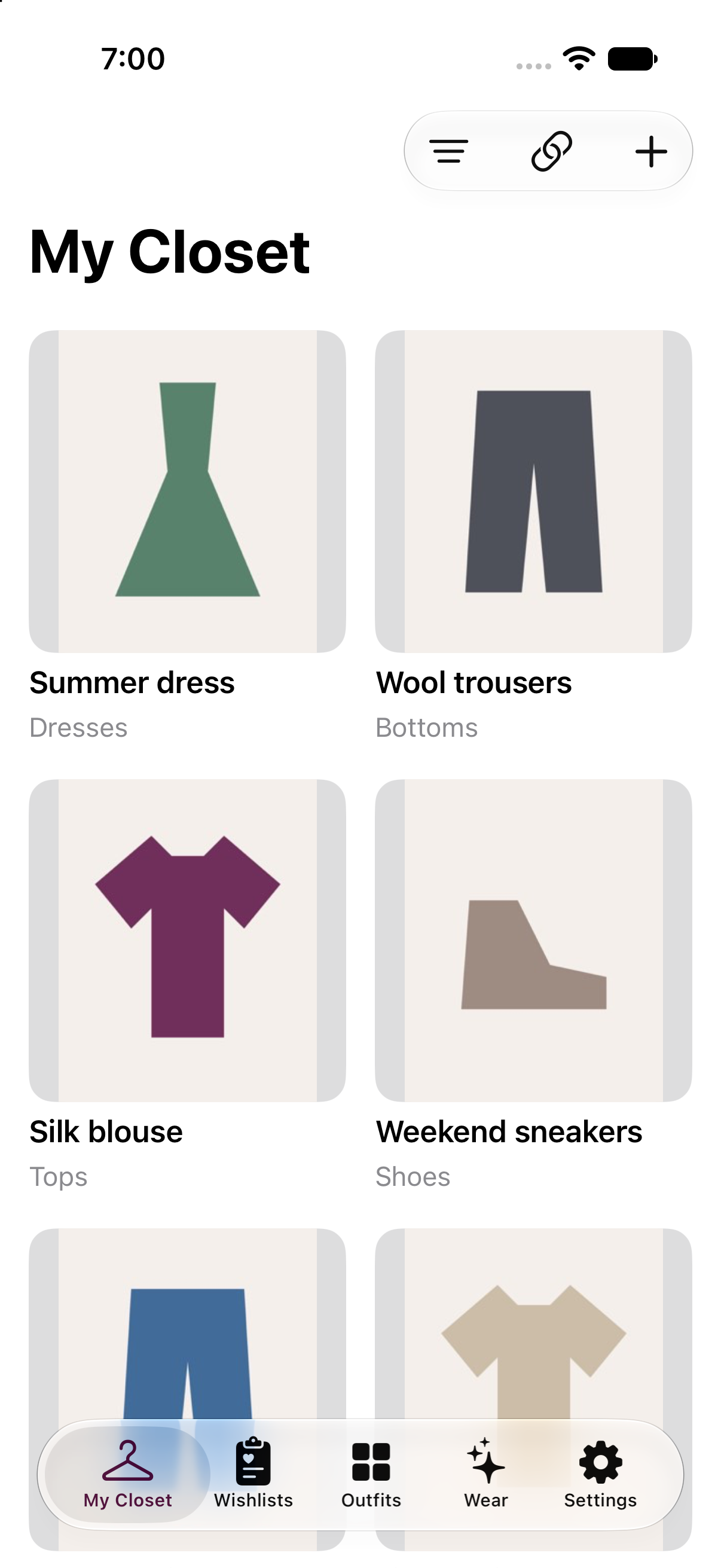
My Closet
- A visual grid of your clothes on iPhone, iPad and Mac. Search by name, brand, type, color or material; filter by category, season, occasion, favorites and status.
- Every piece keeps its story: Owned, Wanted, Listed for Sale, Sold, Donated or Returned. Nothing is ever deleted, only moved.
- Remove a piece. On any garment, choose Remove from closet and say why: donated, sold, returned, or just remove. It leaves your closet, suggestions and counts, but its wear history and memories stay. A Removed list lets you put it back or delete it for good.
- Duplicate a garment when you buy two colors or two of the same, up to ten at once, each its own record.
- Light, dark or match the system, in Settings.
Adding clothes without typing
- Paste a store link in the Add Garment form and tap Fill details. Name, brand, color, price, retailer and photos come from the page. The link you pasted is saved exactly as it was, with no tracking codes added or removed.
- In-app browser for stores that block apps, such as Amazon and Belk. The page opens inside StyleSolved, you browse it yourself, and nothing is copied until you tap Add this to StyleSolved.
- Import from Screenshots. Share or pick screenshots of order and shipping emails. StyleSolved reads them on your phone, finds each item with its name, color, size, price and order date, crops the product picture, and lets you review every field before saving to your closet or a wishlist. The screenshots themselves are never stored.
- Share Sheet. From Safari, Photos, Mail or Messages, share a link or images to StyleSolved and land in the same review screen.
- Visual Intelligence on iPhones and iPads with Apple Intelligence: search a screenshot or the camera view and StyleSolved appears with the clothing it found. One tap opens the review screen. Nothing saves without your confirmation.
Wishlists
- Several named lists. New Wanted items join My Wishlist unless you pick another.
- "I Bought This" turns a wish into an owned garment without a duplicate.
- Share a list through the Share Sheet. What you paid and your private notes never go along.
Coming: private web wishlists with links you can revoke, and gift reservation.
Outfits and Worn Today
- Build outfits from your pieces, rate them one to five stars, mark favorites, Would Wear Again or Do Not Suggest Again.
- Tap Worn Today and the outfit joins your history and calendar. Wore it twice in a day? It asks before recording again.
- Say why. When you rate an outfit, tick what you liked or didn't: comfortable, looked sharp, got compliments, or tight, scratchy, made me hot, shoes hurt. Add your own. Tag the day's style too: classic, boho, business casual, dressy and more. Filter your history by any of them.
- Favorites shelf. Heart a whole outfit and it joins a Favorites row at the top of the Outfits and Wear tabs. One tap on Wear today records it.
- Memories. Add a line to any day you wore something, such as "Wore this to my son's wedding," with a photo if you like, and keep it as a memory. Add one for a past day too. Memories show on the outfit and on each piece, and you can search them. They stay private: never shared, never spoken by Siri, never sent to the cloud stylist.
- Take a photo of today's outfit and keep it with that day, or make it the outfit's cover.
- Share an outfit of the day in square, portrait, story or landscape, with a caption you edit, through the normal Share Sheet to whatever apps you have. No prices, no private notes, no social-media logins inside the app.
Ask the Stylist
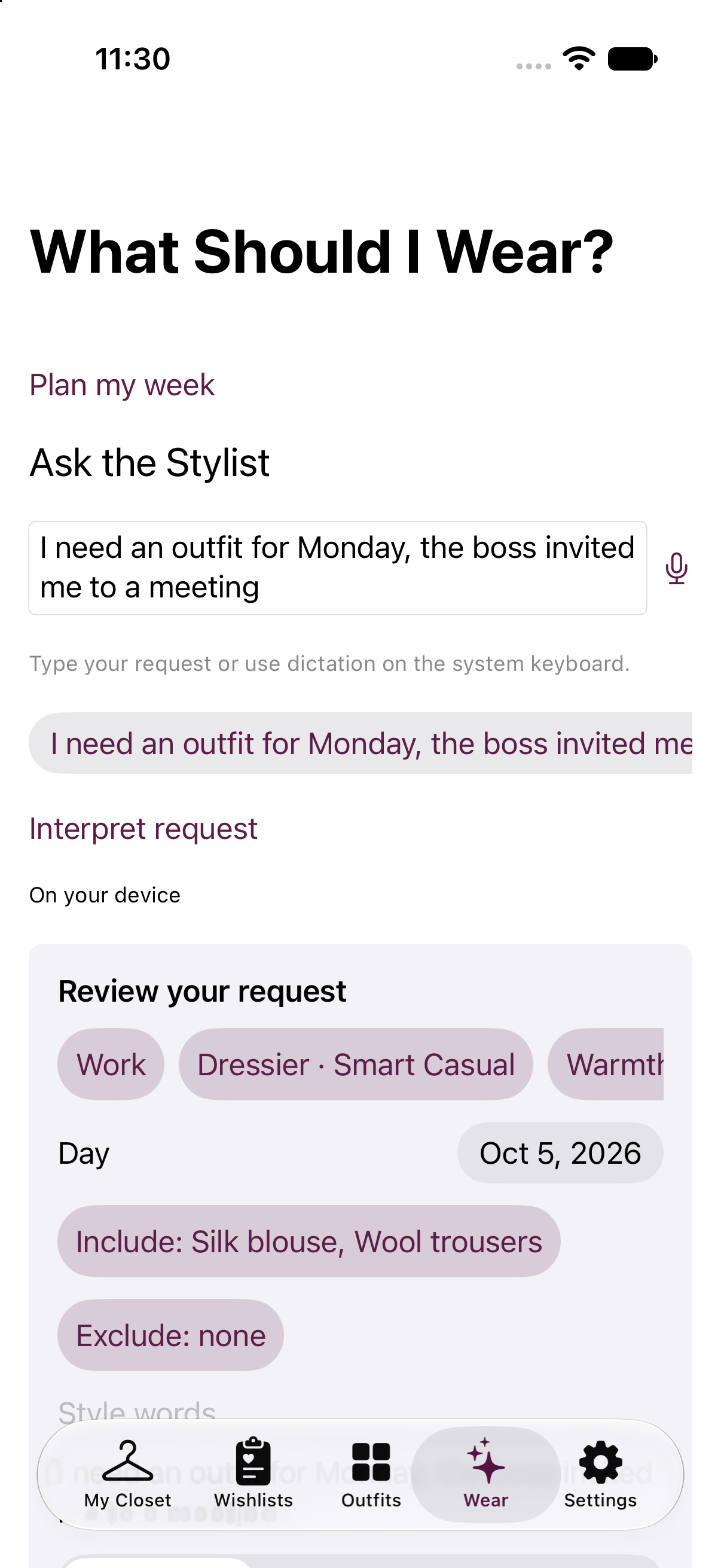
- Ask in words. On the Wear tab, type or dictate "I need an outfit for Monday, the boss invited me to a meeting" or "Something for dinner Saturday, it will be chilly." StyleSolved shows how it understood you, as chips you can edit, before it suggests anything.
- Real clothes only. Suggestions are built from pieces you own that are clean and ready to wear. Rules choose the clothes and explain why: the occasion, the season, the colors, how you rated the pair before, what you haven't worn in a while.
- It learns from you. Outfits you marked comfortable move up. Ones you marked tight, scratchy or hard on the feet move down. Ask for a style and it favors what you've worn in that style lately. Every time, it tells you why, for example "You marked this comfortable twice."
- Thumbs up, thumbs down. Rate any suggestion. A thumbs down removes that combination for the session and moves it well down afterward; a thumbs up moves it up. The stylist says when your votes changed a result. Tap the heart to save a suggestion you like as a favorite outfit.
- Dress like a style icon. Pick a name from a list of forty, from Audrey Hepburn and Jackie Kennedy to Zendaya and Kate Middleton, and StyleSolved builds outfits in that spirit from the clothes you own, saying which signature pieces each outfit covers and which you don't have. Words only; no photos of anyone. A name not on the list can ask the cloud stylist for the usual credit.
- Safe, Mix it up, or Bold. A dial for how adventurous the suggestions should be. Bold allows pattern mixing and brings forward pieces you've been ignoring, and says so.
- Plan my week. One outfit for each workday, no top or dress repeated, bottoms and shoes at most twice, laundry excluded. Swap any day, lock the ones you like, save the plan. A Tomorrow card on the Wear tab shows what's planned, with one tap to record it as worn or skip it. An optional evening reminder is off until you turn it on.
- What goes with this. From any garment, or two pieces you select in the closet, see up to six complete outfits built around them.
- No credits, no limits. Ask the Stylist, Plan my week and What goes with this all run on your device and are included with StyleSolved Plus. Use them as often as you like. Styling credits apply only to the optional cloud stylist described below.
- Styled on your device. On iPhones, iPads and Macs with Apple Intelligence, Apple's on-device model helps understand your request and writes a short stylist note from checked facts. Without it, the rules do the understanding. Nothing from these requests leaves your device.
- Siri too. "What should I wear today in StyleSolved" takes a full sentence, and there are shortcuts for "what goes with this" and "plan my week."
Cloud stylist (optional)
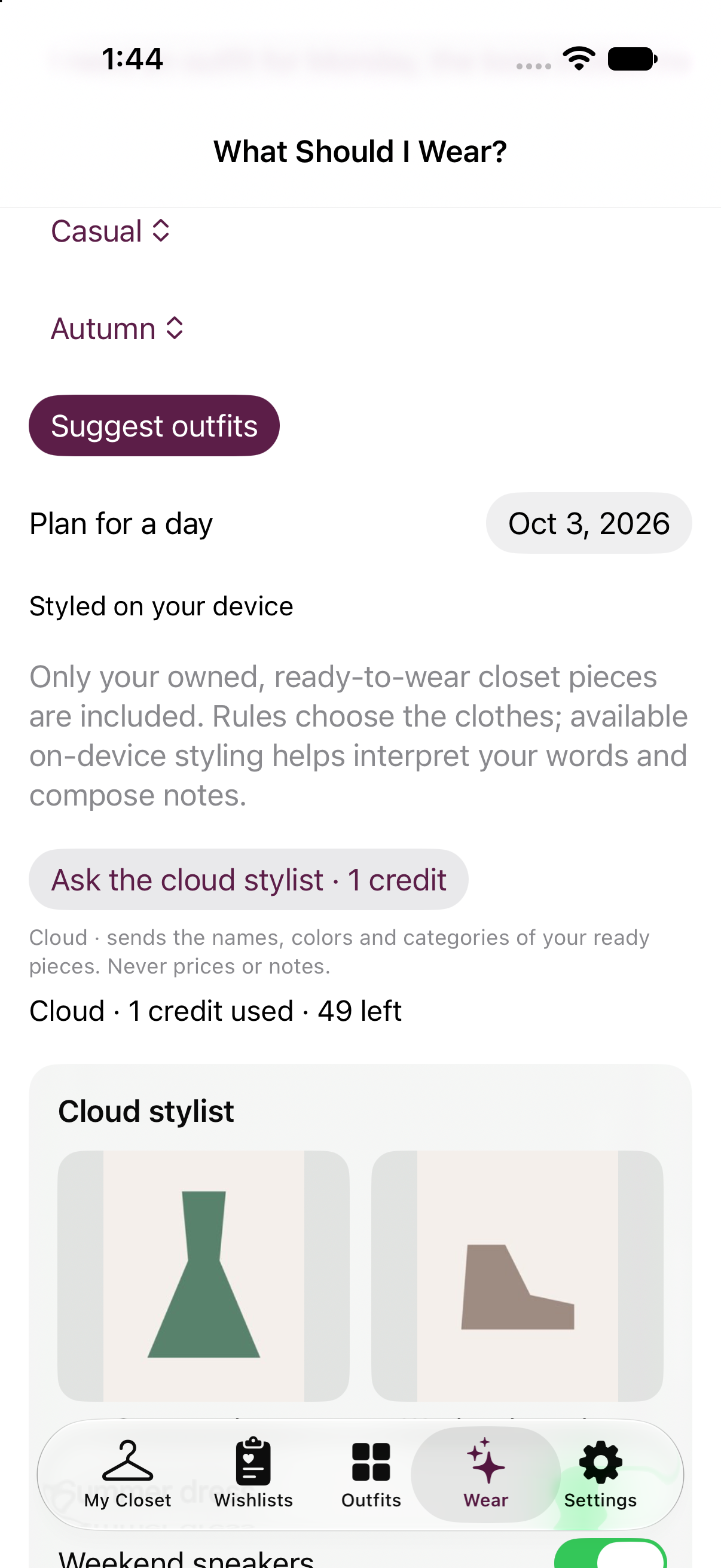
- Off until you turn it on. In Settings, switch on Cloud styling to ask a more capable stylist for ideas. It arranges outfits only from clothes you own, and your device checks every piece it suggests before showing you anything.
- Credits are only for this. The cloud stylist uses a larger, more capable model that costs us money to run, so each cloud request uses styling credits and shows the cost before you send it. Plus includes a monthly allowance. Everything the app does on your device never uses credits.
- What it sends: your request and the names, colors, categories, materials, brands and wear dates of your ready-to-wear pieces. Photos go only if you switch on Send garment photos. Prices, receipts, notes, sizes and measurements never leave your device.
- Better reading of orders and store pages. In screenshot import, and for store links that don't publish product details, an optional cloud reading can fill in the item. Names, addresses, phone numbers, emails, card and order numbers are removed on your phone first, and the screenshot itself is never sent.
Should I Buy This?
- Pick a wishlist item, paste a link or snap a photo, and see how it fits your real wardrobe: how many pieces it coordinates with, roughly how many complete outfits it adds, what it would need to work, and whether you already own something just like it.
- Facts, not verdicts. StyleSolved never tells you to buy or not to buy.
- Wardrobe gaps explain what's missing in words, for example a warm winter layer or shoes for your work trousers.
- Analytics show your most and least worn pieces, never worn, not worn in six or twelve months, cost per wear, and your most versatile items.
Care
- Care suggested from the fabric. Tell StyleSolved a piece is silk, wool, linen or a blend, or let it read the fabric from the name, and it proposes wash, drying, iron, dry-clean and bleach settings, labelled "Suggested from the fabric" until you accept them. A blend follows its most delicate fibre. Anything you set yourself is never overwritten.
- Help with a stain or mishap. Red wine, coffee, grease, ink, blood, grass, sweat marks, makeup, mud, gum, wax, shrinkage, pilling or a colour run: pick the problem and get step-by-step treatment for that fabric, the things never to do, and a plain "take it to a professional cleaner" verdict for silk, wool, suede, leather, lined pieces and anything marked dry-clean only. Log the wash or the trip to the cleaner from the same screen.
- Structured care for every garment: wash method and temperature, drying, ironing, dry-cleaning and bleach rules, plus a photo of the care label.
- After Worn Today, special-care pieces ask what happens next: ready again, laundry, hand wash, dry cleaning or repair. Until you answer they show a Needs Review badge and stay out of suggestions.
- Dry Clean Only pieces warn before the washer, not after. You can override deliberately, and the history records that you did.
- Repairs and alterations with provider, date and cost. Pieces under repair are out of suggestions until they're back.
Coming: Scan Care Label.
Money
- Price paid, discount, tax, shipping, retailer, purchase date, return deadline and a private receipt photo.
- Spending by month, year, category, brand and retailer, with returns and refunds shown as credits.
- Cost per wear for every piece, from what you paid and what you actually wore. Imported orders split their shipping and tax across the items by price, so the numbers match what left your account.
Siri, Shortcuts and Spotlight
- Say "Log my outfit in StyleSolved", "What should I wear today in StyleSolved", "Add to my StyleSolved closet" or "Open my closet in StyleSolved". The same actions work in the Shortcuts app and on the Action button.
- Shortcuts can find your garments by category, color, brand or availability, log wear, update care, read your closet counts, and open any garment or outfit.
- Your garments appear in Spotlight by name, category, color and brand. Nothing else is indexed, and nothing leaves the device.
- Siri never speaks prices, purchase details or private notes.
StyleSolved Plus
- Free: a closet of up to 30 items, wishlists, outfits, Worn Today and manual care notes, for as long as you like. Your first link import and first screenshot import are free too.
- Plus: an unlimited closet, What Should I Wear, Should I Buy This, analytics and spending, structured care and after-wear prompts, link and screenshot import, and sync across your devices through your own iCloud.
- 7-day free trial, then $1.99 a month or $15.99 a year through your Apple ID. If a subscription ends, nothing you entered is deleted. The closet becomes read-only above 30 items until you subscribe again.
Private by design
- No StyleSolved account. Your wardrobe lives on your devices and syncs through your personal iCloud with Plus.
- No analytics, no tracking, no third-party SDKs.
- The optional cloud stylist is the one feature that sends anything to us, only when you turn it on and ask, and never your prices, notes or measurements.
- Screenshots and the text read from them are never stored. Only the garment details you approve are kept.
Platforms
- iPhone, iPad and Mac, one app, on iOS, iPadOS and macOS 26 or later. Visual Intelligence needs an Apple Intelligence device.
Coming: Home Screen widgets and Control Center controls, and an Apple Watch companion.